


Coffee Bag Dieline & Artwork Templates
Coffee Pouch Dieline Templates for Your Packaging Artwork
Preview common flat bottom coffee pouch dielines before preparing your packaging artwork. Browse reference sizes for 4 oz, 8 oz, 1 lb and 2 lb coffee bags, or contact Runlong Pack for a dieline matched to your actual packaging project.
Flat Bottom Coffee Pouch Templates
Browse Coffee Bag Dieline Reference Sizes
Preview common flat bottom coffee pouch dielines for 4 oz, 8 oz, 1 lb and 2 lb packaging. Open each preview to inspect the artwork layout, then request the editable PDF, AI or SVG version for your actual packaging project.
Actual fill capacity may vary depending on coffee bean density, roast level, pouch structure and filling requirements. Final pouch dimensions and dielines should be confirmed before artwork approval and production.
Flat Bottom Coffee Pouch
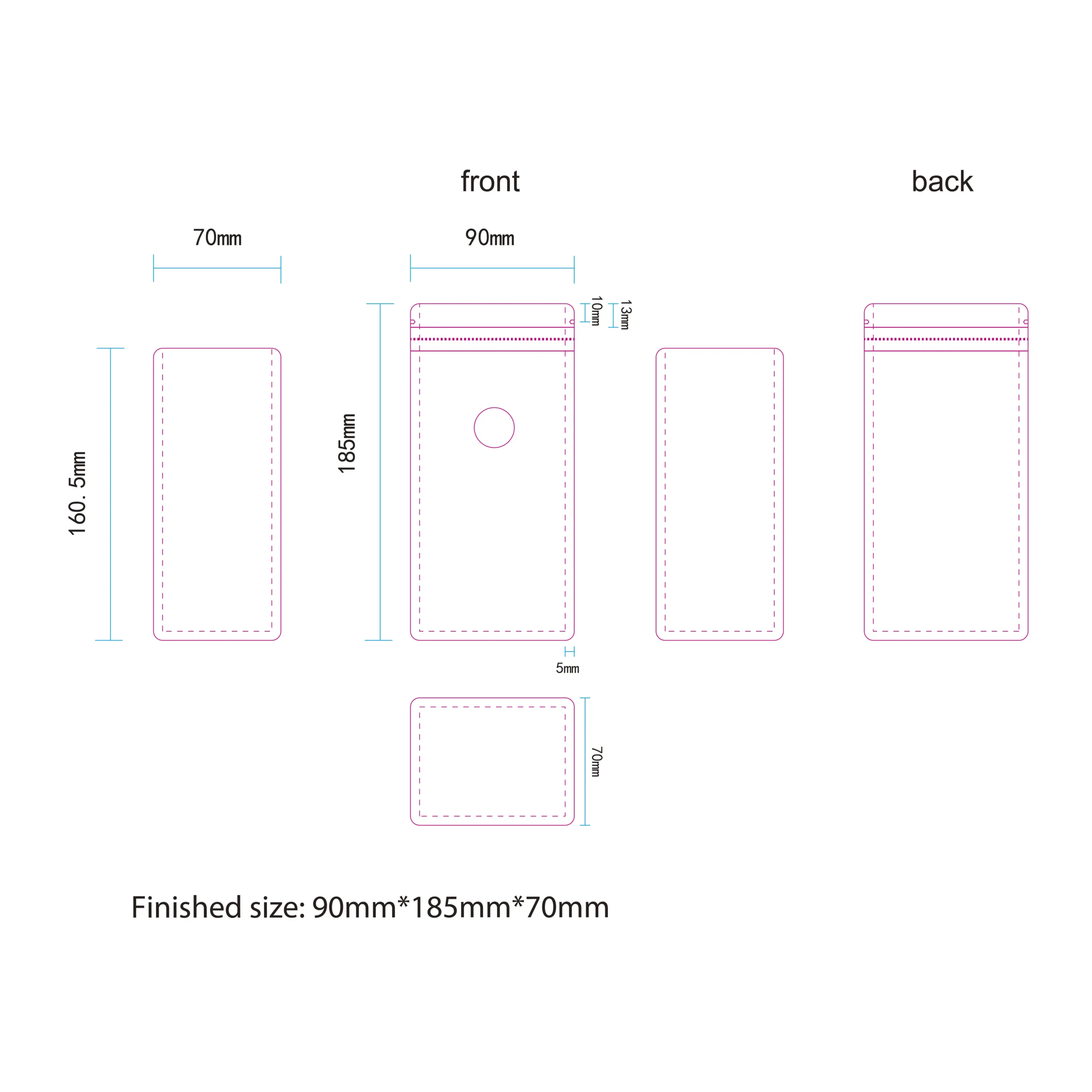
4 oz Coffee Pouch Dieline
Preview the front, back, side gusset and bottom panels before preparing artwork for this compact flat bottom coffee pouch reference size.
Flat Bottom Coffee Pouch
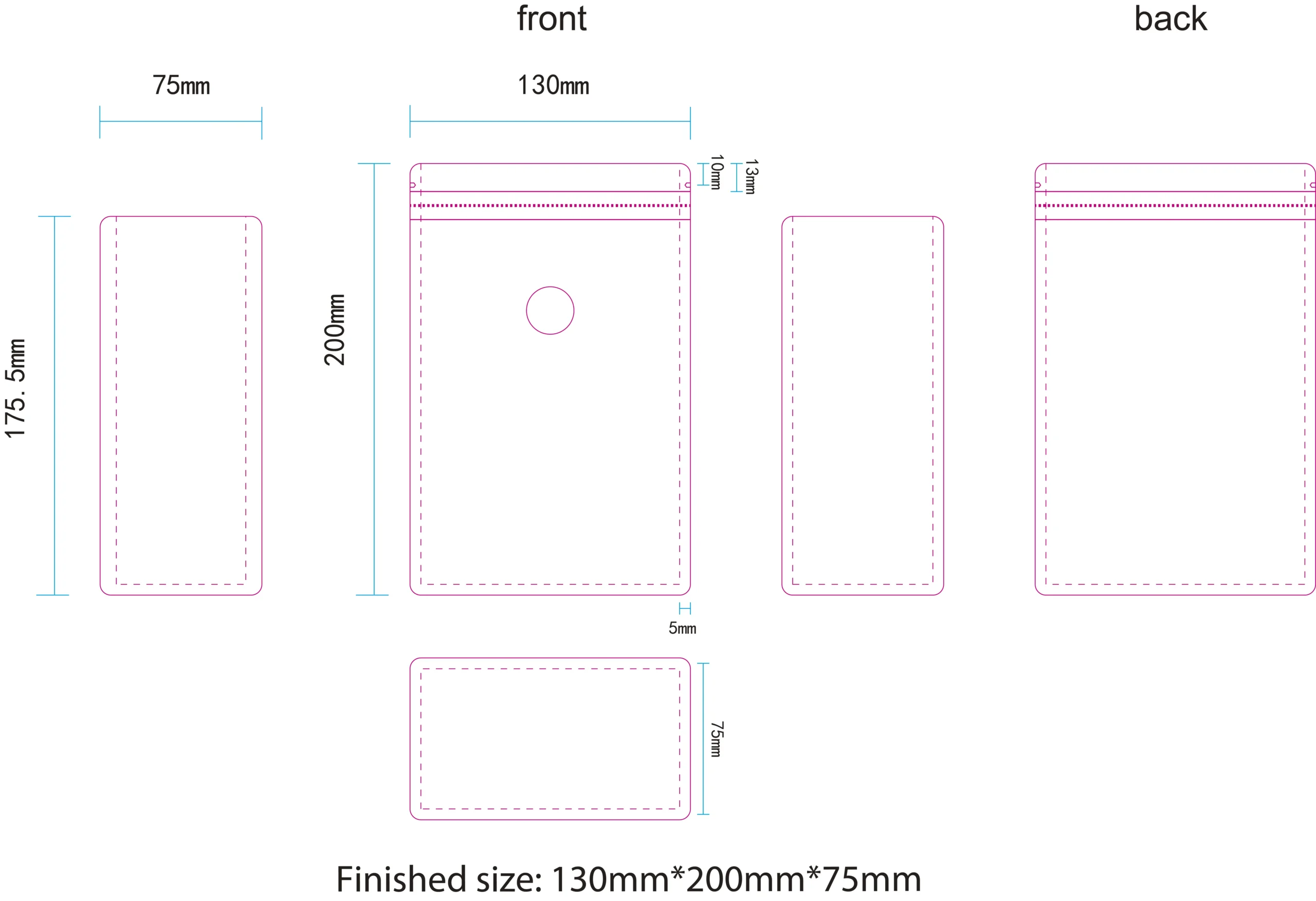
8 oz Coffee Pouch Dieline
A reference flat bottom pouch format for smaller retail coffee packs, with separate artwork areas for front, back, side gussets and bottom panel.
Flat Bottom Coffee Pouch
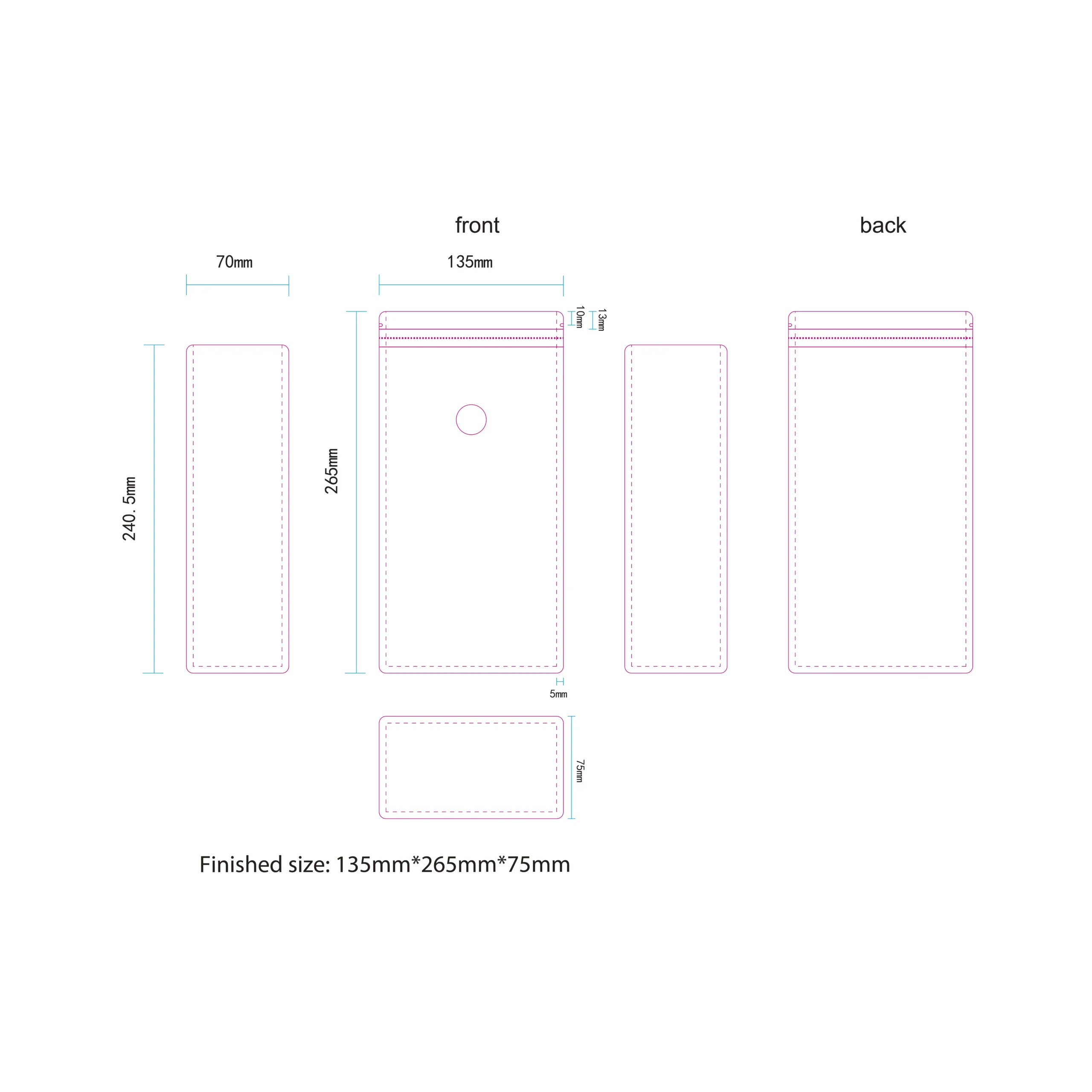
1 lb Coffee Pouch Dieline
A larger reference pouch format with additional printable surface area for coffee branding, product information and retail artwork.
Flat Bottom Coffee Pouch
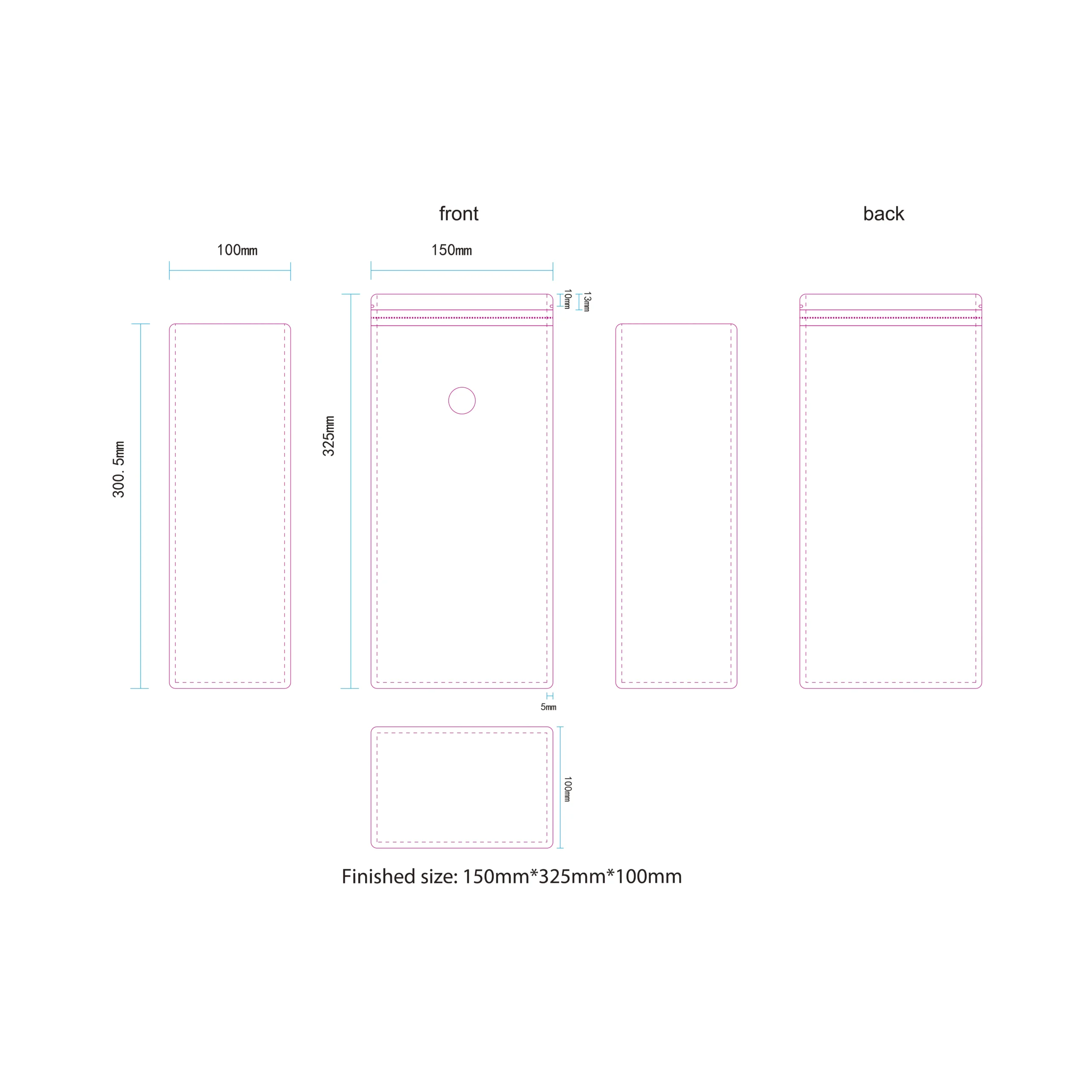
2 lb Coffee Pouch Dieline
A larger coffee pouch reference for projects requiring more filling volume and additional printable artwork space.
Need a Different Coffee Pouch Size?
These dielines are reference sizes. If your coffee packaging requires a different width, height, gusset, fill weight or valve position, send us your project requirements and we can discuss the appropriate dieline before artwork preparation.
Editable Artwork Templates
How to Get Your Editable Coffee Pouch Dieline
Use the online previews to choose a suitable starting point, then send us your project information. Runlong Pack can confirm the appropriate pouch dimensions before providing the editable artwork template.
Choose a Reference Dieline
Browse the 4 oz, 8 oz, 1 lb and 2 lb flat bottom coffee pouch previews and identify the size closest to your packaging project.
Send Your Project Details
Tell us your coffee fill weight, preferred pouch size, estimated quantity, valve requirement and any other packaging details you already know.
Confirm Size & Pouch Structure
We review the intended fill, pouch dimensions and packaging requirements before confirming the dieline to use for your artwork.
Receive the Editable Template
After the appropriate dieline is confirmed, request the editable artwork file for preparing your coffee packaging design.
Coffee pouch dimensions can vary with bean density, roast level, desired fill volume, valve position and packaging construction. Confirming the correct size first helps reduce artwork rework and avoids preparing a design on an unsuitable template.
Ready to Request Your Editable Dieline?
Send us the reference size you prefer and the packaging information you already have. Our team can help confirm the appropriate template for your coffee pouch project.
Coffee Pouch Artwork Guide
How to Read and Use a Coffee Pouch Dieline
A flat pouch artwork file may look confusing at first because the front, back, side gussets and bottom panel are all shown on one flat layout. The example below shows how each printed panel becomes part of the finished coffee pouch.
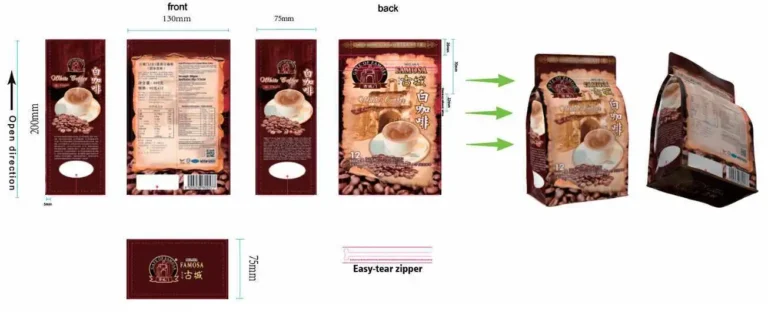
This example shows how the front, back, side gussets and bottom panel on a flat pouch dieline correspond to the surfaces of the finished bag. Use the panel labels and orientation as a guide when placing your artwork.
Place Your Artwork in 4 Steps
Start with the final editable dieline confirmed for your pouch, then use the panel layout to position your design correctly.
Identify Each Panel
Locate the front, back, side gussets and bottom panel before placing logos, product information or background graphics.
Check Panel Orientation
Some gusset and bottom artwork may appear rotated on the flat template. Review the finished pouch orientation before positioning directional graphics or text.
Respect Structural Areas
Keep important information away from sealing, folding, zipper and other structural areas shown on the confirmed production dieline.
Review the Finished Bag
Consider how the flat artwork will wrap around the final pouch so logos, text and visual elements appear correctly after bag making.
✓ Artwork Setup
- Extend edge-to-edge backgrounds into the bleed area shown on the final template.
- Keep important logos, text and barcodes inside appropriate safe areas.
- Check side gusset and bottom panel orientation carefully.
- Confirm zipper and degassing valve position before final approval.
! Important to Avoid
- Do not use the preview image itself as a production artwork file.
- Do not redraw or move structural dieline elements without confirmation.
- Avoid placing critical information directly on seal or fold areas.
- Do not finalize artwork before the actual pouch dimensions are confirmed.
Always prepare your artwork on the editable dieline confirmed for your actual pouch size and construction. Bleed, sealing areas, zipper position, valve position and other production details may vary between pouch specifications.
Need Help Placing Your Artwork?
Send us your coffee pouch size and existing artwork. Runlong Pack can help confirm the appropriate dieline and review the artwork layout before production preparation.
Custom Coffee Pouch Dielines
Need a Custom Coffee Pouch Size?
The 4 oz, 8 oz, 1 lb and 2 lb dielines on this page are useful reference sizes, but your coffee packaging does not need to follow a standard template. Runlong Pack can discuss a custom pouch size based on your product, filling requirements, packaging structure and artwork.
What Can Be Customized?
Build the Pouch Around Your Coffee Packaging Requirements
A suitable coffee pouch depends on more than the weight printed on the front. Dimensions, gusset depth, closure features and valve placement can all affect the final dieline and artwork layout.
Send us the coffee fill weight you plan to pack and the pouch dimensions you prefer. We can discuss whether the width, height or gusset should be adjusted before your artwork is placed on the final dieline.
Yes. Coffee pouch dimensions can be discussed based on the intended fill weight, pouch format and project requirements. Once the appropriate dimensions and pouch construction are confirmed, an editable artwork dieline can be provided for design preparation.
Custom Coffee Packaging
Looking for Custom Printed Coffee Bags?
Explore Runlong Pack's custom coffee bags with flexible pouch sizes, custom printing, resealable zippers, one-way degassing valves and packaging structures selected for your coffee project. Use the dieline resources on this page to prepare your artwork, then continue to our coffee packaging page to explore production options.
Dieline FAQ
Coffee Pouch Dieline Questions
Before preparing your coffee packaging artwork, review these common questions about reference pouch sizes, editable dielines, custom dimensions and artwork checking.
Are the dieline previews on this page production-ready files?
No. The images shown on this page are reference previews for understanding common flat bottom coffee pouch layouts and dimensions. The final production dieline should be confirmed for your specific packaging project before artwork approval.
How can I get the editable PDF, AI or SVG dieline?
Send Runlong Pack your preferred reference size, coffee fill weight and available project information. After the appropriate pouch dimensions are confirmed, you can request the editable artwork template in an available format such as PDF, Adobe Illustrator or SVG.
Can I request a coffee pouch size that is not listed here?
Yes. The 4 oz, 8 oz, 1 lb and 2 lb options are reference sizes only. Width, height, bottom gusset and other pouch dimensions can be discussed based on your intended coffee fill and packaging requirements.
Does a 1 lb pouch always hold exactly 1 lb of coffee?
Not necessarily. Coffee bean density and roast level can affect the volume required for the same net weight. The capacity labels on this page are therefore reference values rather than guaranteed fill capacities.
Can the zipper or degassing valve position be changed?
Pouch features such as zipper and one-way degassing valve placement should be discussed before the final artwork is prepared. Their position can affect the available design area and should be shown correctly on the confirmed dieline.
Can Runlong Pack check my artwork before production?
Yes. You can send your packaging artwork together with the confirmed pouch information for layout review before production preparation. This can help identify obvious issues related to dieline placement, panel orientation and packaging features.
Do I need finished artwork before requesting a dieline?
No. You can start with your coffee fill weight, preferred pouch format, approximate size and estimated quantity. The dieline should normally be confirmed before your final artwork is completed.
Do I need to know the packaging material before requesting a template?
No. If your material structure has not been finalized, tell us about your coffee product and intended packaging use. Material, barrier, printing and pouch construction can be discussed as part of the packaging project.
Always confirm the actual pouch dimensions, structural features and production artwork template before finalizing your design. This helps reduce artwork revisions and avoids designing on a dieline that does not match the final pouch.
Start Your Coffee Packaging Project
Need the Editable Dieline for Your Coffee Pouch?
Tell us which reference size you are considering, or send your own required dimensions. Runlong Pack can discuss the pouch size, artwork template and packaging requirements before your design moves toward production.


